
Powerful features to increase your productivity
Our Plans
We understand the challenges small businesses face, which is why Book Visit Now keeps pricing simple. You get the complete application with all features included—the only difference between our plans is the number of active clients you can manage.
Two Simple Plans
FREE PLAN
Use every Book Visit Now feature with up to 10 active clients at no charge.*
PRO PLAN — $24.99/month
Manage unlimited active clients while continuing to enjoy every Book Visit Now feature.
Start Free. Upgrade When You Need To.
We recommend starting with the Free Plan. There are no reduced features or stripped-down tools. You get the complete Book Visit Now experience.
As your business grows and you need more than 10 active clients, simply upgrade to Pro. Your client limit becomes unlimited, without changing the way you use the application.
* What Is an Active Client?
For Free Plan purposes, an active client is a client currently occupying one of your available client slots. When you book an appointment for a client, that client remains active for 90 days. Additional qualifying appointments can extend that active period.
Once a client is no longer active, their slot becomes available for another client. Their historical information is not deleted, so your past appointments, sales, and business records remain part of your reporting and history.
The Free Plan allows you to have up to 10 active clients at one time.
Your Options as Your Business Grows
- Stay on the Free Plan: Continue using all Book Visit Now features with up to 10 active clients.
- Upgrade to Pro: Remove the active-client limit and manage unlimited clients for $24.99 per month.
- Cancel Pro Anytime: Return to the Free Plan and choose up to 10 clients to remain active. You may choose fewer than 10 if you want to keep available slots open for future clients. Your historical business data remains available, and your reports can still be viewed and exported.
Your Business. Your Clients. Your Data.
Whether you use the Free or Pro Plan, your business and client information remains under your control. Book Visit Now uses your private iCloud account to sync information across your Apple devices.
We do not maintain your client database on our servers, advertise to your clients, promote competing businesses to them, or require your clients to create Book Visit Now accounts or download another app.
Book Visit Now Features
Book Visit Now gives independent professionals and small service teams the tools to schedule appointments, manage clients, communicate efficiently, and understand business performance – all in one app. It is built for salons, spas, wellness providers, consultants, instructors, repair professionals, and virtually any business that works by appointment.
The app supports iPhone, iPad, and Mac and securely syncs data across devices through iCloud.
Book Visit Now links your existing Apple apps together, creating a single location to use your existing contacts, create an appointment, which syncs to your Apple Calendar, and then use your existing Messages and Mail apps together with pre-built templates for reminders and notifications. It includes ingenious built-in tools to help prevent double booking, an appointment notification center, business reporting, appointment notes, and mapping tools to visualize where your clients are coming from.
Book Visit Now was built from real-world experience.
After decades of experience with technology, appointment scheduling, client follow-up, and service-based businesses—and years of trying appointment systems that often seemed more interested in marketing to customers than serving the businesses using them—we decided to build something different.
Book Visit Nowfs puts the focus back where it belongs: on your business, your clients, and your way of working.
Schedule and Calendar
- Day, week, and month calendar views
- Streamlined day picker and multi-day capacity view on iPhone
- Three, five-, or seven-day week views on iPad and Mac
- Configurable business hours
- Fifteen-, thirty-, or sixty-minute appointment intervals
- Color-coded capacity indicators with customizable thresholds
- At a glance (or touch on iPhone) view of hours and dollars booked for any day
- Swipe navigation between days on iPhone
- Special Event icon – User can set up special events in settings that will display a chosen icon on the calendar as a reminder.
- Slide-out appointment inspector/editor on iPad and Mac
- Calendar display for staff time off and special events
- Smart Availability. Control how much open time appears on your calendar by strategically limiting available appointment slots, helping you maintain a fuller-looking schedule while keeping the flexibility you need.
Appointment Management
- Create and manage appointments by client, provider, location, services, and products
- Appointment collision detection to help prevent double booking, unless you want to.
- Add multiple services and products to one appointment
- Override appointment pricing when needed
- Override appointment duration
- Add preparation and cleanup time before or after services
- Track appointment status, including: ScheduledChecked InCompletedNo ShowRescheduledCanceled
- Maintain a complete status and change history
- Record formulas, products used, results, and appointment notes
- Detect scheduling conflicts
- Sync appointments with Apple Calendar
- Send text and email notifications using the device’s Messages and Mail apps
- Generate PDF invoices
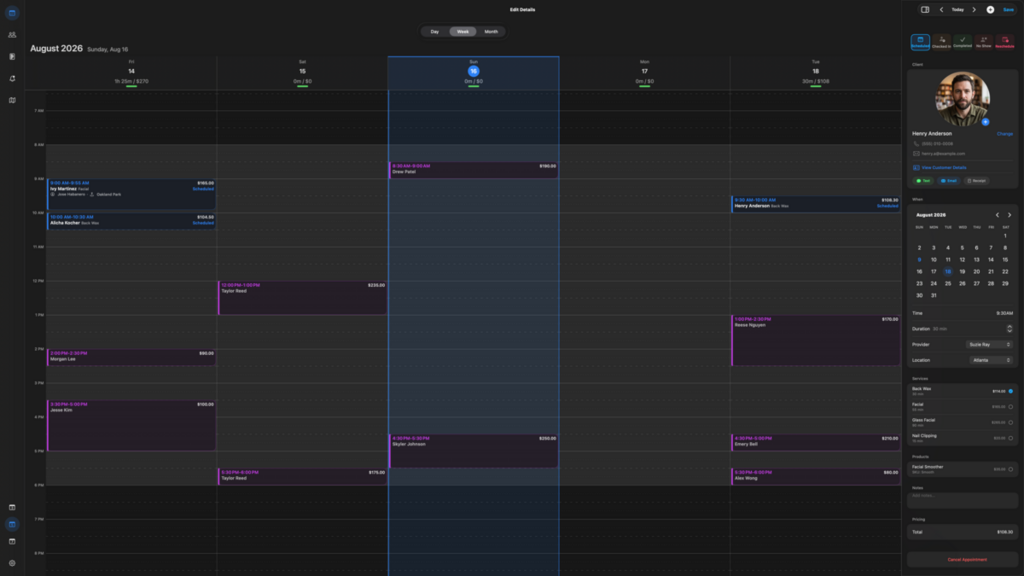
Mac Desktop View
Mac Desktop View shown with 5 day work week. It has options for 1, 3, 5, or 7 day, and monthly views.
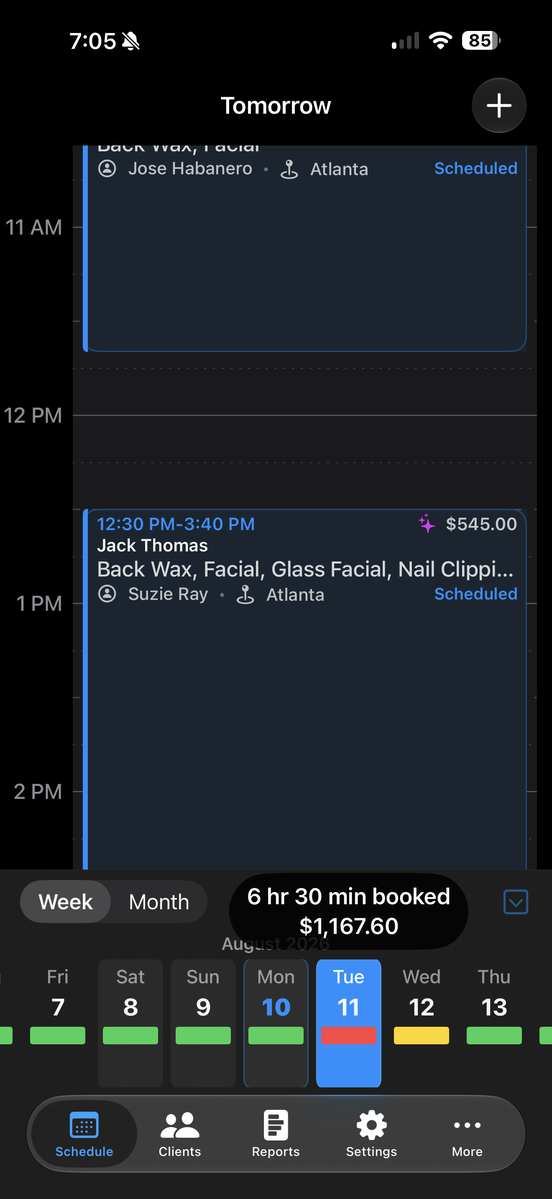
iPhone Calendar View
iPhone Calendar day view featuring a sliding week picker at the bottom.
Colored bars will visually represent how full your day is, utilizing user-defined hour thresholds.
Pressing and holding on any day will display the total hours booked along with the estimated charges for that day.
Appointment Notification Center
View upcoming appointments in chronological order and quickly prepare client notifications by text or email. Visual indicators make it easy to see which appointments have already received notifications, what type of notification was sent, and how many notifications have been recorded.
Client Communication & Notification Tools
Stay in touch with clients quickly and consistently using built-in communication tools designed to work with the Apple apps already on your device.
Book Visit Now includes customizable text and email templates that help you prepare common client communications without repeatedly typing the same information for every appointment.
Unlike automated SMS or email marketing platforms, Book Visit Now uses the contact details in your client record to prepare messages through Messages or Mail. Terminus Finalis does not receive your client database or route your messages through a Book Visit Now marketing service. You review and send each message yourself.
Client Photos
Display a linked Apple Contact’s photo in the client profile. Before-and-after treatment photos are managed separately in SOAP notes.
Customizable Text & Email Templates
Create and edit reusable templates for common client communications, including:
- Appointment Confirmations
- Appointment Reminders
- Cancellations
- Rescheduling Notifications
- Long Time No See / Client Follow-Up
Send Through Apple Mail or Messages
Book Visit Now pre-populates the selected communication and opens it in Apple Mail or Messages, where you can review, edit, and send it yourself. The communication remains within the normal Apple workflow rather than being routed through a third-party marketing or messaging platform.
Communicate Directly From Appointments or Client Profiles
From an individual appointment or directly from a Client Profile, you can quickly:
- Call the client
- Prepare an email
- Prepare a text message
These tools help reduce repetitive typing, improve consistency, and keep client follow-up organized while allowing the business to retain control over its client information and communications.
Client Management
- Integration with Apple Contacts, Apple Calendar, Apple Mail, and Apple Messages
- Client Profile page show all customer info, notes and appointment history from a single page. Links from within Client Profile Page to Call, Text or Email client. Additional links let you pull up client address in Apple Maps or Google Maps.
- Client photos pull from Contacts or custom images
- Pull from existing contacts, or add new clients to contacts during appointment creation
- Private client ratings emoji. Only you know what the emoji means
- Client Preferences
- Client notes
- “Do Not Book” designation
- Client acquisition source tracking
- External referral tracking and estimated referral value
- Complete appointment and spending history
- Client appointment status history lets you know how often a client keeps, changes, or cancels appointments
- Scanned document and PDF storage
- Client history and spending report PDFs
- Client archiving without removing historical reporting data
- Automatic duplicate detection using contact information
- Flexible, client-specific pricing.
- Loyalty Discounts
- Customize service and product pricing for individual clients, apply loyalty discounts, or manually override standard pricing.
Business Reports
Financial Performance
- Gross revenue, Net profit and taxes collected by time period
- Revenue split between services and products
- Sales margins
- Service and product profitability
- Missing-cost-data audit for products or services
- Most and Least profitable services and products.
Staff Performance
- Booked hours
- Revenue by provider
- Rebooking rates
- Provider-generated referrals and referral value
- Number of unique clients
Client Value and Retention
- Highest-value clients
- Clients with high service costs relative to revenue
- Clients inactive for 30, 60, or 90 days
- No-show history
- Client acquisition sources
- Referral activity
Business Activity Log
- Complete audit trail of bookings, edits, status changes, and deletions
Business Settings
Customize Book Visit Now to reflect how your business actually operates. Business Settings brings your company information, providers, locations, services, products, taxes, scheduling preferences, time off planner, special events reminders, communications, and appearance together in one place.
Sync Contacts
When you create a new contact in Book Visit Now it will add that contact to your Apple Contacts. If you make changes in your Apple Contacts, you can manually sync those changes back into Book Visit Now, choosing what information to keep.
Activity Log
Review recorded bookings, edits, and appointment status changes. Client archiving preserves historical records.
Company Information
Set up the core information used throughout the application, including:
- Business name
- Mission statement or slogan
- Company logo
Your business identity can be used throughout Book Visit Now to create a more consistent, professional experience.
Providers & Locations
Configure the people and places associated with your business, including:
- Provider contact information
- Multiple business locations
- Location-specific addresses
- Room or suite information
- Telephone details
Providers and locations operating under the same iCloud account can be organized within the same business environment.
Services & Products
Create and maintain a detailed catalog of the services and products your business offers.
For services, you can manage information such as:
- Service name
- Appointment duration
- Customer price
- Internal cost information
Additional cost details used for business reporting and profitability analysis
Advanced cost tracking allows you to build a more complete picture of what individual services actually cost your business, helping identify higher-cost and higher-margin offerings.
Product management includes:
- Product names
- SKUs
- Selling prices
- Internal costs
- Product photos
This information can be used throughout appointments, client records, sales activity, and reporting.
Taxes & Fees
Configure taxation based on the way your business operates, including:
- Separate tax rates for services and products
- Tax-rate changes over time
- Historical tax information for more accurate reporting of past transactions
This helps ensure that historical business records remain consistent even when tax rates change.
Calendar & Booking Rules
Control how your calendar behaves and how appointments can be scheduled.
Settings include:
- Regular business hours
- Appointment time intervals
- Calendar capacity preferences
- Booking restrictions
- Scheduling rules
- Availability exceptions
The Staff Time-Off Planner makes it easy to record vacations, appointments, personal time, or other exceptions without changing your normal business hours.
Client Communication
Customize reusable text and email templates for common client communications, including:
- Appointment confirmations
- Appointment reminders
- Cancellations
- Rescheduling
- Client follow-up
- Long Time No See messages
Templates help create consistent communications while reducing repetitive typing.
Book Visit Now prepares these communications for use with the Apple Mail and Messages apps already on your device, rather than routing client contact information through a separate messaging platform.
Appearance
Choose the interface that works best for you and your Apple devices.
Smart Availability
Smart Availability adds visual filler to your own calendar display so it can appear fuller when someone is viewing your screen. It does not create real client appointments or provide an online booking page
iCloud Sync
Book Visit Now maintains its own client and business records locally and synchronizes supported information through your private iCloud database when enabled. Terminus Finalis does not host a separate copy of your client database..
Built Around Your Business
Book Visit Now is designed to adapt to different businesses rather than forcing every business into the same workflow. From operating hours and service pricing to communications, taxes, locations, and calendar behavior, Business Settings give you extensive control over how the application works for you.